
Rates in PM3 are used to define how much a specific role or resource will cost per day/hour of effort (based on the resource time unit setting under Admin > General). So for example, a resource with an internal rate of £12 will cost £12/hour (assuming hours as the resource time unit).
PM3 contains several locations where you can enter rates at different levels. These different levels provide granular levels of control when it comes to defining rates for your resources. You can define rates against the role, so all resources in that role will inherit said rates, or you can override the default role rate by adding a rate against the resource. You may even add plan-specific rates for the resource to specifically override the rate of a resource in the context of that particular plan.
The rates view can be found in the following locations:
- Resourcing > Roles > Rates - Default role rates
- The Resourcing > Roles view is the most limited and does not display the Source or Role columns, as these are not applicable at this level. The only rates visible in this view will be rates from the role itself. These rates are inherited by default on all resources that are a member of this role, for as long as they are members of this role (i.e. an inherited role rate will cease to apply when a user's tenure in a role comes to an end)
- Resourcing > Resource Details > Rates - Override resource rates
- The Resourcing > Resource Details view has a few more features on top of the Resourcing > Roles view. It contains the source and role columns, which tell you what type or rate record a row is, and what role it was inherited from, respectively. This screen will display both inherited rates from the role (as read-only records) as well as any override rates entered directly on this screen. An override rate record may overlap an inherited rate (and the override record will take precedence if it does so), but may not overlap another override rate.
- Plan > Resources > Resource Rates - Plan override rates
- The Plan > Resource Rates view is very similar to the Resourcing > Resource Details view, in that it allows you to view both inherited and override rates (both read-only at this level). In addition to this, you may also add and view plan-level override rates that apply to the resource only in the current plan. These plan rates cannot overlap one another but may overlap either inherited or resource override rates. Non-plan-owner UW users cannot make changes to this screen.
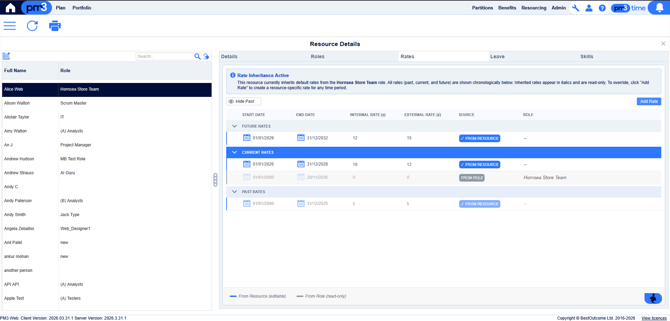
The rates are broken up into different temporal groupings - Future rates, Current rates, and Past rates. By default the past rates (rates that have an End Date prior to the current date) will be hidden from view, in order to reduce clutter. To toggle historic rates, click the Show/Hide Past button in the top-left.
To add a new rate, click the Add Rate button in the top right to display the inline Add Rate form. When adding a rate, you must ensure that:
- The Start Date does not exceed the End Date
- The rate does not overlap any other rates on the role
- Either the internal rate, the external rate, or both are not empty, and neither are invalid numbers. Rates must be positive numbers up to two decimal places.
Once you have filled in all of the details, clicking the “Add” button to the bottom-right of the form will add the new row to the grid, highlighting it.
You may edit existing rates in the grid by clicking on the appropriate fields to change them. The same rules for adding rates applies to editing rates, so you cannot have overlapping or negative rates. To delete a rate, click the X at the left of the rate’s row.
Adding a rate on the Resource Details screen will add the rate as an override. These overrides have all the same rules as adding rates to the Resourcing > Roles screen, however it is important to note that they do not check for overlap with the inherited rates, they only check for overlap against other override rates. This is because in order to override a rate, you need to overlap it. The order of precedence for rates is as follows:
Plan Override Rate for the current time period
> Resource Override Rate for the current time period
> Role Inherited Rate for the current time period
As such, having a resource override rate covering the same period as an inherited role rate will override that inherited role rate for the resource.
Inherited rates’ start and end dates will be capped to not exceed a resource’s role membership; as such the StartDate is displayed as the latest of the resource’s role membership start date vs the role rate’s start date, and the EndDate is displayed as the earliest of the resource's role membership end date vs the role rate’s end date.