
At a Glance
- New, more flexible resource role and rate management
- Introduction of Open API (Phase 1)
- Improved Jira integration (direct import)
- Updated SharePoint integration (modern authentication)
- General performance and technical improvements
Key Enhancements
1. Resource Roles & Rates – Major Upgrade
This is the biggest change in the release.
We’ve completely reworked how roles, rates and resource assignments are managed to give you more flexibility and better historical tracking.
What’s changed?
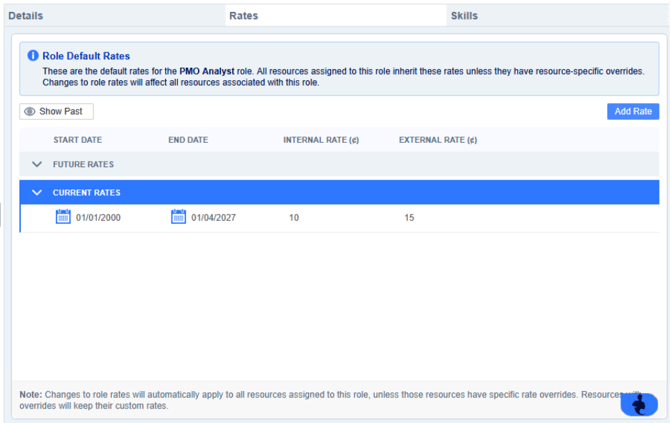
Dedicated tabs for clarity
Both Roles and Resource Details screens now include structured tabs:
- Details
- Rates
- Skills
- (Resources also include Roles and Leave)
This makes it much easier to navigate and manage information.
Time-based Rates (NEW)
Rates are now time-bound, meaning you can define different rates for different periods.
What this means for you:
- Set future rate changes in advance
- Keep a full history of previous rates
- Avoid overwriting old data
Good to know:
- Existing rates have been migrated automatically
- Historic rates are hidden by default (use Show Past to view them)
- Rates cannot overlap and must be valid positive values
Time-based Role Assignments (NEW)
Resources can now be assigned to roles with start and end dates.
What this means for you:
- Track how roles change over time
- Align roles with rate changes
- Improve reporting accuracy
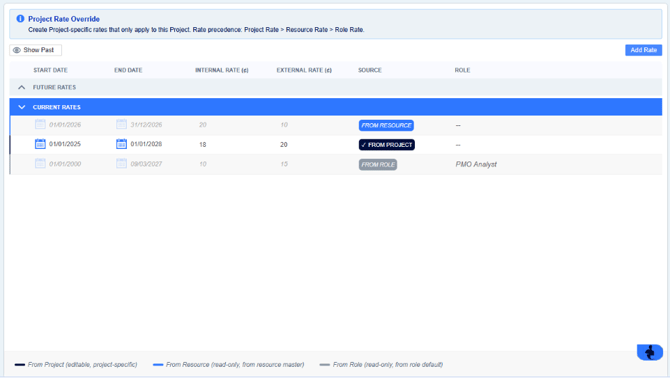
Inherited vs Override Rates
Rates now work in three layers:
- Role Rates (default)
- Resource Override Rates
- Plan/Project Override Rates
How it works:
- Resources inherit rates from their role
- You can override rates at resource level
- You can override again at plan level
Priority order:
Plan rate → Resource rate → Role rate
New Plan-Level Rate Management
You can now manage project-specific rates directly within a plan:
Plan > Resources > Resource Rates
What this means for you:
- Adjust rates for specific projects without changing global settings
- Better financial control at plan level
Permissions:
- Only Plan Owners, Admins or Resource Managers can edit
- Others have read-only access
Open API (Phase 1)
We’ve introduced the first version of the PM3 Open API.
What it does:
- Allows external systems to create plans automatically
- Populate key fields on the Plan Details page
Why it matters:
- Reduces manual data entry
- Enables integration with other systems
- Lays the foundation for future automation
This is just the start — more API capabilities will follow in future releases.
SharePoint Integration Update
The SharePoint integration has been upgraded to use Microsoft Graph API.
Why this change?
Microsoft is moving away from Basic Authentication, which many clients are now disabling.
What this means for you:
- More secure and future-proof integration
- Continued connectivity with SharePoint
- Alignment with Microsoft best practices
Action required:
- Configure a new Azure App registration
- Update settings in PM3 under Admin > General
Jira Integration – Now Much Simpler
You can now import Jira data directly into PM3 — no more spreadsheets.
New Process (4 steps)
- Create an API token in Jira
- Add credentials in PM3 Admin
- Link a Jira project to your plan
- Import data via the Product Backlog
What this means for you:
- Faster setup
- No manual file handling
- Cleaner, more reliable data import
Important:
- This is a read-only, one-way sync
- Imported data will be overwritten on re-sync
- Changes should be made in Jira, not PM3
Additional Improvements:
- General performance enhancements
- Technical improvements across the platform
What You Need To Do:
Depending on your setup:
- Resource Managers: Review new rate and role functionality
- Admins: Update SharePoint integration (if applicable)
- Jira Users: Start using the new direct import feature
- All Users: Familiarise yourself with the updated layouts
PM3BI
| #27569 | Customization enhanced to support Apostrophe inclusion |
| #29012 | GetCapacityDetails call now includes Default Capacity |
| #28752 | GetPlans call now returns Programme/BCP-level workstreams |
| #28613 | GetResourcePlanDetails call no longer returns incorrect data |
| #19099, #27601 | GetDeliveryStatusCrossTab call no longer times out |
| #24720 | GetPlans call now returns the Revised End history fields correctly |
| #28741 | GetAllLogs now works for PM3 instances using DataSync |
Reports
| #19314 | 'Financial Details - Whole Plan Range' report has been optimised |
| #27493 | Reports that use a 'Financial Status' table now rolls-up correctly |
| #28223 | 'Programme Highlight Report' has had a restriction removed on the 'Highlight Reports' table where previously, a maximum of 8 rows could be shown |
| #27568 | 'Programme Highlight Report' no longer throws an error when scheduled |
| #29597 | The 'Actual This Period' value on the 'Status Dashboard Variant F' report now correctly matches the Financial Status page |
| #18120 | Global Benefits for Plan (A3) now correctly now maps to the right benefits |
| #27054 | Portfolio Extended Timeline Breakdown History > Budget column fixed |
| #24832 | CIP Programme Report > Changed the 'Forecast YTD' to 'Revised Target YTD' |
Technical Improvements
| #28029 | Changed module loader for PM3 |
| #27997 | Gantt Chart page > A message has been added for converting Milestone to Summary Task |
| #27518 | Milestone Plan page > An option has been added to the tool ribbon to import milestones from Asta project |
| #28834 | Gantt Chart page > Add weekend include/exclude check box. Import calendar information from MPP |
| #27167 | Cost Categories can now be rearranged in alphabetical order |
| #28778 | Addressed 3rd party package vulnerabilities |
Bug Fixes
| #25027 | Benefits Definitions print > Fixed error when there are no owners |
| #28014 | Changed message when a wrong file type is selected during the import of a Asta powerproject file |
| #27330 | Fixed case of removing Person on Team page affecting Person.LicenseCode |
| #17965 | Financial Status page > Changing from Summary to Detail driven no longer saves incorrectly |
| #29590 | Fixed issue with Roles sub-tab where Non-current Roles were displayed in selector window on Resource Summary page |
| #28612 | Gantt Chart page > Fixed error when adding a task |
| #28066 | Fixed issue where gateway milestones can be deleted from the Gantt Chart when multiple rows selected |
| #28855 | Fixed issue where Resource Rates sub-tab would not show up when navigating from Plan-> Resource tab |
| #28959 | Fixed issue where the 'Show View' button was overlapping with Gateways dropdown list on the Milestone Plan page |
| #29434 | Proper validation message now shows for 'invalid cost' value when adding Risk/Issue |
| #28975 | Plan Owner now showing for plans on Portfolio Details page |
| #26510 |
Fixed issue where double-clicking a row on the Plan Actions page refreshed the page |
| #27571 | Gantt Chart page > Fixed issues with expanding Summary Tasks and Plan Data corruption |
| #27634 | Fixed issue with adding a Parent Plan, where an error would be thrown when Risks exist |
| #28044 | Fixed issue with percenttage complete not updating against a milestone in Gantt |
| #27341 | Fixed a back-end issue with the batch processor affecting the Windows Event Log |
| #28668 | Fixed issue where exporting the Gantt Chart to xlsx and csv was not working |
|
#28072 |
Admin Customisation page > Fixed error when adding field to dropdown |
| #29627 | Fixed issue where existing description text is replaced when inserting hyperlink in Plan Description |
| #29838 | Fixed issue where the selected dropdown value does not save on Benefits table |
| #29563 | Fixed error being thrown when importing wrong file type on the Gantt Chart |
| #28218 | Gantt Chart page > Promoted Milestones can no longer be converted to Summary Tasks |
| #28012 | Fixed a back-end issue where re-ordering milestones could cause an error accessing any plan |
| #27526 | Addressed the PNG Export for carriage returns long text fields |
| #28054 | Made decimal place settings work for rates on Resource Capacity pages |
| #29428 | Roles are now able to be deleted that have data in archived/deleted plans |
| #28264 | Gateways Approval email > Fixed error when approving |
| #29467 | The chosen 'Default Home Screen' option is now applied |
| #21337 | Reports Configure > Setting a Custom Delivery Status' now displays correctly on the report row |
| #26382 | Revoking PM3 Licence > Now works with Cancelled Resource Requests |
| #26818 | Add Person > The 'Enable PM3BI' checkbox is now saved |
| #28013 | Cost Categories page > The HTML table export now displays a populated table |
| #28797 | Fixed issue where an error would would display when loading the Portfolio > Financial Management page |
| #29868, #29564, #28764 | Fixed issue where an error would would display when loading the Programme > Financial Status page |
| #24968 | Portfolio Details > Custom fields now reflect changes made from Admin page |
| #27501 | Fixed a filtering issue when changing format Admin > General |
| #29593 | Expenditure items are now added above capex/opex title row instead of below in the table for BCP/Programme/Project |
| #27485 | Browser refresh is no longer required after adding User Logs |
| #26681 | Resource Details > Annual Leave is now sorted in descending order |
| #27635 | Milestone Plan page > Fixed issue where specific milestones could not be updated |
| #29001 | Fixed a issue that caused a "Dangerous Site" Warning Message to be displayed in Chrome |
| #28768 | Risk & Issues page > Now saves your selected view after navigating away from the page |
| #28833 |
Improved the page loading speed on Home > Projects tab |