
Since in most companies, billing and invoicing occurs within an existing finance system, billing has been removed from PM3time except in so far as billing and invoicing information can be extracted via reports for import into systems such as Xero. There are three reports that are designed for this, and they are editable Excel files which can be manually modified for loading into other Financial systems.
The three new exports are as follows, they can be run from the Reports page.
-
Xero Export – Billing – Expenses: Supplier expenses – entries which you must pay
-
Xero Export – Billing – Time: Supplier billed time – entries which you must pay
- Xero Export – Sales – Time + Expenses: billed time and expenses for which you invoice which your Customers must pay.
Xero Export Billing – Expenses
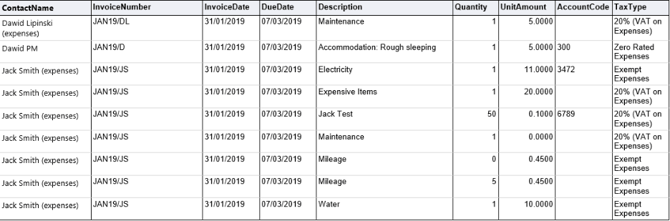
- The Invoice Number is taken from a Person’s details on the Admin > Users page, with and represented in the form “YYYY/<Initials>” with YYYY being the year as defined by the start date and Initials being the initials of the user the expense is owned by.
- The Invoice Date is set by the report parameter, and the Due Date is calculated by Invoice Date + 35 days.
- The Mileage Total is from the expense row on Home > Expenses
- The Unit Amount is either the Mileage Rate if a mileage expense, otherwise it is the total from the expense line (both from Home > Expenses)
- The Account Code and the Tax Type is the Billing Account Reference Code and the Tax Rate fields respectively from the expense type details on Admin > Expenses
Xero Export Billing – Time
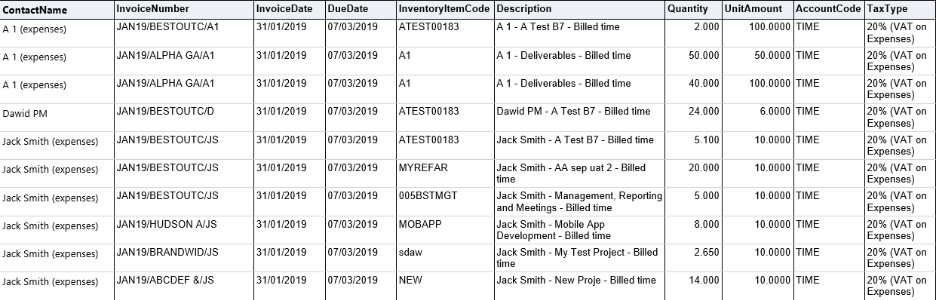
- The Invoice Number is calculated, in the format of "YYYY/<ClientShortName>/<Initials>" (with YYYY being the year as defined by the start date, ClientShortName being an abbreviation of the ClientName the time was filed against (Home > Clients), and Initials being the initials of the user the expense is owned by (Admin > Users))
- The Invoice Date is set by the report parameter, and the Due Date is calculated by Invoice Date + 35 days.
- The Inventory Item Code is the Project Code from Home >Projects
- The Description is in the format of "<UserName> - <ProjectName> - Billed time" (UserName from user record (Admin > Users), ProjectName from project record (Home > Projects))
- The Quantity if the number of hours worked at this rate for this week (from Home > Timesheet)
- The Unit Amount is the Internal Rate Hourly field from Admin > Resource Groups > Default Rates
- The Account Code will always output the string "TIME", users can modify their outputted report file to alter this if necessary
- The Tax Type is a system-defined default tax type label, currently set to "20% (VAT on Expenses)" - in future releases we may add a mechanism to alter this default
Xero Export Billing – Sales – Time + Expenses
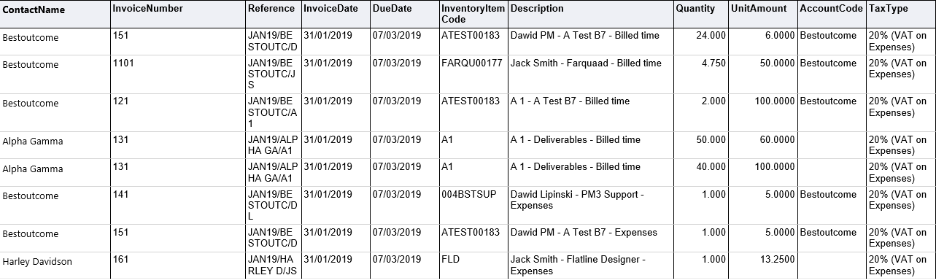
- The Invoice Number is in the form "<Prefix><InvoiceNumber><Suffix>". From report parameters - takes the defined invoice start number and enumerates it for each individual invoice record generated, then applies the provided prefix (and suffix if provided)
- The Reference is calculated in the format of "YYYY/<ClientShortName>/<Initials>", with YYYY being the year as defined by the start date, ClientShortName being an abbreviation of the ClientName the time was filed against (Home > Clients), and Initials being the initials of the user the expense is owned by (Admin > Users))
- The Invoice Date is set by the report parameter, and the Due Date is calculated by Invoice Date + 35 days.
- The Inventory Item Code is the Project Code from Home >Projects
- The Description is in the format of "<UserName> - <ProjectName> - [Billed time / Expenses]" (UserName from user record (Admin > Users), ProjectName from project record (Home > Projects), and [Billed time / Expenses] depending on what type of record the row is)
- For the Quantity field, if it is a time unit, it is the number of hours worked at this rate for this week (Home > Timesheet) summed up. If it is an expenses unit, the value is simply 1.
- For the Unit Amount field, if it is a time unit, the “Rate” is used (from External Rate Hourly field from Admin > Resource Groups > Default Rates). If it is an expenses unit, then the value is the sum of the total column for expenses on the Home > Expenses page.
- The Account Code field is populated from the ‘Account Ref’ field on the Home > Client > Billing page.
- The Tax Type is a system-defined default tax type label, currently set to "20% (VAT on Expenses)" - in future releases we may add a mechanism to alter this default.