
Overview
PM3BI is an optional add-on to PM3 and PM3time which allows secure, controlled read-only access to your PM3 database. It essentially enables you to pull data out of the Live PM3 database into tables of your own. The PM3BI queries return a front-end table (but behind the scenes, consist of complex queries on multiple tables in the underlying database). In this way, the queries together make up a simplified OverView of the database which is summarised in the accompanying virtual Data Model document.
Credentials will be required to access PM3BI web service. To access the PM3BI web service, you must exist as a Person within the corresponding PM3 or PM3time database, and in addition, have an access flag set by the PM3 support team. You can organise this via your account manager. Your credentials to PM3BI will be the same as those on PM3 or PM3time.
The PM3BI web service provides data in either JSON or (SOAP) XML format, based on a parameter in the query. Various reporting tools prefer one or other of these, for example, Crystal Reports works best with the JSON whereas the XML interface is most useful when accessing data with Excel or a custom program written in say, C#.
The various reporting tools which you can use to extract data, will have different mechanisms for specifying the web query. These will normally be found under heading something like Data Source.
PM3 Datamart is being fazed out and replaced with PM3BI for future releases R6.3 and onwards. Material referring to Datamart as such will be replaced with PM3BI. Infrastructure has been moved over to Microsoft Azure.
PM3BI Landing Page - Browser Interface
In order to get started, we recommend browsing to your PM3BI Landing page. The url required to connect to your landing page is https://<companycode>.pm3bi.mypm3.com/ where <CompanyCode> will be replaced with your assigned company code.
https://companycode.pm3bi.mypm3.com
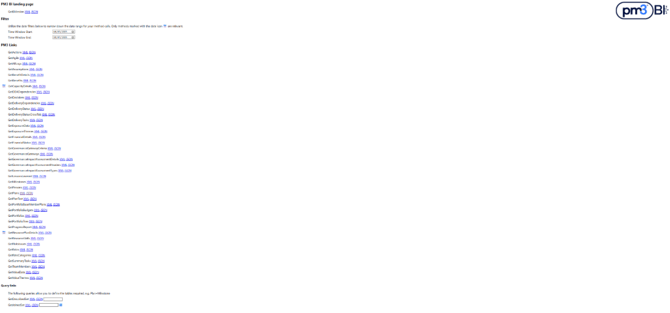
This takes you to a page with several sections as shown below. In the section PM3 Links, there is a line for each available table.
- On each such line, there are 2 links, one for XML format and one for JSON.
- Firstly of course, you will need to login
-
- If you click any link, you will be invited first to login using your PM3 credentials.
-
-
- These will work provided your PM3 user has been enabled for Datamart Access.
-
-
-
- Contact your account manager to get this organised. It needs to be done by the Bestoutcome Support team.
-
-
-
- We recommend you click on the GetBIVersion link first to login, because it is fast.
-
- When you click on any link, it will open a new tab and populate it with the data for that table.
- Hover over a link to see (at the bottom of your browser) the actual query that is being called when you click it.
-
- This query is the actual query you should use when using a tool like Excel or Power BI to extract a table.
-
- So this hover information is useful documentation.
For example, the query
https://xxx.pm3bi.mypm3.com/RefData.asmx/GetPlans?ContentType=JSON
will return the Plans table in JSON format whereas
https://xxx.pm3bi.mypm3.com/RefData.asmx/GetPlans?ContentType=XML
or simply
https://xxx.pm3bi.mypm3.com/RefData.asmx/GetPlans
will return the Plans table in XML format. (Since the default ContentType=XML, it is not necessary to specify it, but it does not hurt if you do).
Note the query url is just the PM3BI url + RefData.asmx/Getzzz where zzz is the table you want.
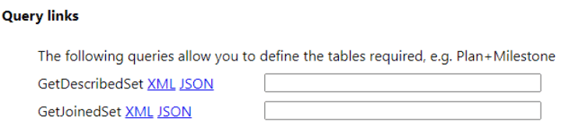
In the section, Query Links, there are 2 mechanism to select multiple tables at once –
- DescribedSet – which returns just a list of separate tables
- JoinedSet – which returns one big table with all the nominated tables joined together on planid
-
- Just be careful of putting too many tables in this one because you could end up with a huge resulting table.
These are described in detail further down.
Referring to Datamart as such will be replaced with PM3BI. Infrastructure has been moved over to Microsoft Azure.
PM3TimeBI Landing Page
The url required to connect to your landing page is https://pm3time<companycode>.bestoutcome.com/datamart
where <companycode> should be replaced with your assigned company code.
The PM3datamart landing page for PM3time is shown below
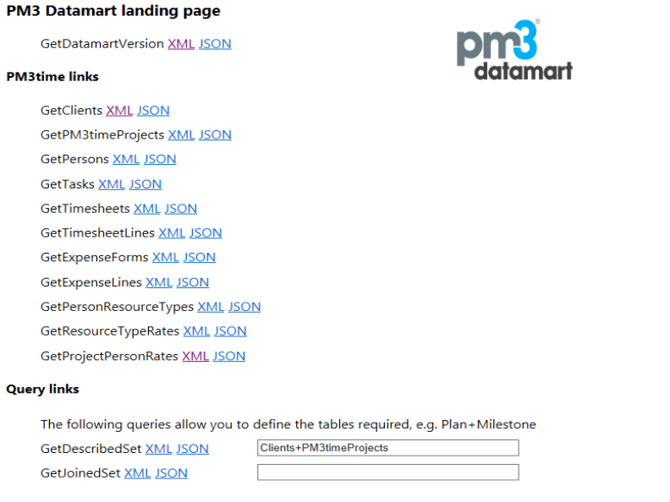
If you have both products, both sets of links will appear on the page.
Programme Interface
You need some tool to access the PM3BI programmatically. This tool can be something like Microsoft Excel, Microsoft PowerBI, or a programme that you have written yourself. In fact, any tool will do if it can
- query a website with the queries described above
- provide the right credentials, and
- accept the returned data in JSON or XML format.
The exact queries that are available, can be found on your PM3BI Landing page, by hovering over the appropriate link. The general structure of a single table query is:
- https://<companycode>.pm3bi.mypm3.com/refdata.asmx/Get + tablename
- For example, for PM3
- For PM3time,
- Where the xxx is taken from your normal PM3 or pm3time company code.
Query Parameters
Parameters are values or options which can be added to the web query. Some arguments are general and may be used with all methods. They are listed here. Others are specific to individual methods and they will be listed with the method itself. Parameters are separated by & and can appear in any order.
ContentType Allows the caller to select the format of the data returned. Options are XML or JSON with the default being XML (the only option available previously). This parameter is optional. For example :
- https://xxx.pm3bi.mypm3.com/RefData.asmx/GetPlanText?ContentType=XML
NoSchema - The NoSchema parameter is optional and is accepted by any of the methods provided. It defaults to true i.e. does not provide schema. It allows the user to request data with schema information, if it can be used by the calling program. This is not commonly required.
- https://xxx.pm3bi.mypm3.com/RefData.asmx/GetPlans?NoSchema=false&ContentType=JSON
Parameter names are case sensitive.
Note that the parameter UseRTF is now obsolete. It can still be used in queries but is now ignored.
Multi Table Methods
In this section, we describe how you can extract multiple tables at once. You can select any of the tables listed in the Appendix. You may wish to have several tables within a single report, or to have sub-reports.
In addition, we provide the mechanism to join several of the tables above into one table. One of the benefits of this mechanism is that users can construct tables combining just the information that is required, without having to download large quantities of data that is not relevant. This improves response time and reduces memory and disk requirements too.
CAVEAT – if you attempt to extract too many tables at once, you are likely to overload the server and the export will fail. If you want many tables, it is best to export each individually e.g. each in a separate query in a separate Excel tab.
GetDescribedSet
This method allows you to return a list of tables in a single request. The example below shows how to request the table from GetPlans and the table from GetMilestones.
- https://<companycode>.pm3bi.mypm3.com/RefData.asmx/GetDescribedSet?Tables=Plan+Milestone
These are returned as separate tables. The list can be extended to include any of the tables provided, using these table references:
- Plan, PlanText, Milestone, DeliveryStatus, DeliveryStatusCrossTab, ProgressReport, RisksIssues, Benefit, PortfolioTree, PortfolioPlans.
- Clients, PM3timeProjects, Tasks, Persons, Timesheets, TimesheetLines, ExpenseForms, ExpenseLines, PersonResourceTypes, ResourceTypeRates, ProjectPersonRates
GetJoinedSet
This method allows you to join (in the SQL sense) or paste two tables together, automatically using common key fields. These joins are all simple INNER joins designed to allow you to experiment. To do more sophisticated joins, you will need to use your own MIS tools.
Initially we show some examples from PM3.
In the example below, we show how to return a single table, joining the contents of the Plan table and the PlanText table so that there is one row per plan, and the columns are a combination of those of the two individual tables (without repeats). The common key is PlanID.
- https://<companycode>.pm3bi.mypm3.com/RefData.asmx/GetJoinedSet?Tables=Plan+PlanText
In the second example below, we explain how to return a single table, joining the contents of the Plan table and the RiskIssues table so that there is one row per plan, and the columns are a combination of those of the two tables (without repeats). The issue here is that there the RiskIssues have one row per risk or issue, so that means this table will have all the plan information duplicated on every row. The common key is PlanID.
- https://<companycode>.pm3bi.mypm3.com/RefData.asmx/GetJoinedSet?Tables=Plan+RiskIssues
And here is an example which uses portfolios. The common key is PlanID.
- https://<companycode>.pm3bi.mypm3.com/RefData.asmx/GetJoinedSet?Tables=PortfolioPlans+Plan
Also for logical reasons, if your set of tables to join includes PortfolioTree then it must also include PortfolioPlans, since all the other tables require a PlanID with which to join (and PortfolioTree does not contain PlanID).
- https://<companycode>.pm3bi.mypm3.com/RefData.asmx/GetJoinedSet?Tables= PortfolioTree+PortfolioPlans+Plan
Lastly, there are some combinations which do not make much sense e.g. RiskIssues+Benefit. If there were 100 Risks and 100 Benefits, this would produce a table of 10000 rows, where each risk/issue is combined with each benefit on each plan where they occur, because the common key is PlanID. There is no other link between Risk/Issues and Benefits. Consequently such combinations are disallowed by PM3BI.
Next we show a few examples from PM3Time.
The following query will get the list of tasks within projects within clients. Each Task has a reference to the Project in which it resides, and each Project has a reference to the Client to which it belongs.
- https://<ServiceURL>/datamart/RefData.asmx/GetJoinedSet?Tables= Clients+PM3timeProjects+Tasks
The next query obtains each Person and their Details and the ResourceTypes they are in, and when, and the Default Rates those Resource Types attract and for what period. Note that the 2 time periods do not necessarily co-incide. A Person may be a Project Manager from July 2015 to June 2017 and the Rate for a Project Manager might be £500 per day from Jan 2015 to Dec 2015 and £600 per day from Jan 2016 to Dec 2016. So during his time as a Project Manager, the person will have 2 different rates.
- https://<ServiceURL>/datamart/RefData.asmx/GetJoinedSet?Tables=Persons+PersonResourceTypes+ResourceTypeRates
The last example shows Timesheets and TimesheetLines. This is a large query, returning the largest tables in the database.
- https://<ServiceURL>/datamart/RefData.asmx/GetJoinedSet?Tables= Timesheets+TimesheetLines
Note that the parameter UseRTF is now obsolete. It can still be used in queries but is now ignored.
Appendix A - PM3 Methods
Many column names can be customized within PM3. If you run these queries, you will receive your customized column names specific to your configuration. The information listed below refers to the standard non-customised column names.
GetActions
Returns a table with one row for each Action from the Home>Actions page with the following fields. Note – not all Actions relate to a Plan and so may not have a PlanID. You may not be using all fields.
ParentActionID, ActionID, ActionDescription, ActionTypeID, ActionTypeDesc, ActionStatusID, ActionStatusDesc, StatusTag, ActionPriorityID,ActionPriorityDesc, ActionPriorityDisplay, RaisedBy, RaisedByName, DateRaised, DatePlannedEnd, DateRevisedEnd, DateCompletion, ActionMergedEndDate, DeliveryStatusLight, DeliveryStatusLightCalculated, DeliveryStatusDisplay, DeliveryStatusOverride, AssignedTo, AssignedToName, PlanID, RiskIssueID, RiskOrIssue, RiskIssueCode, MilestoneID, MilestoneCodeFull, MilestoneName, UpdateUser, UpdateUserName, ActionSortString, ActionResolution
GetAgile
Retrieves information related to Agile ScrumBan and Agile Sprints. Each sprint and story is associated with a specific plan, with tasks detailed within the ScrumBan stories.
SprintID, PlanID, SprintName, StartDate, EndDate, SprintPoints, Goal, SprintPointsCompleted, StoryID, StoryName, StoryDesc, StageName, StoryPoints, StoryType, ExternalKey, ExternalURL, OwnerID, OwnerName, Acceptance, TaskID, TaskName, TaskDesc, TaskStatus, AssignedToID, AssignedName, WorkEstimate, WorkDone, ETC, WorkUnit
GetAllLogs
Returns a table with one row for each plan for each custom log, with the following Log fields and custom fields. You may not be using all fields.
PlanID, LogID, LogTypeCode, LogTypeName, Disabled, <custom fields>
GetAssumptions
Returns a table with one row for each plan, with the following Assumption fields. You may not be using all fields.
PlanID, DDAID, DDATypeCode, FString1, FString2, FString3, FString4, FString5, FText1, FText2, FText3,FText4, FText5, FText6,FDate1, FDate2, FDate3, FPersonID1, FPersonID2, FPersonID3, FPersonID4, FPerson1Decode,FPerson2Decode, FPerson3Decode, FPerson4Decode,FDropDown1Decode, FDropDown2Decode, FDropDown3Decode, FDropDown4Decode, FDropDown5Decode, FDropDown6Decode
GetBenefits
Returns a table with one row for each benefit, with the following fields. You may not be using all fields.
PlanID, BenefitID, BenefitName, BenefitDefinition, BenefitOwner, BenefitUnitID, BenefitUnitName, RAGBoundary, RAGDirection, Positive, Global, Financial, HasMilestoneLinks, MilestoneChangeDate, HighestMilestoneRAG, HighestMilestoneRAGDisplay, SortOrder, FString1, FString2, FString3, FString4, FString5, FString6, FString7, FString8, FString9, FString10, FDate1, FDate2, FDate3, FText1, FText2, FText3, FPersonID1, FPersonID2, FPersonID3, FNumber1, FNumber2, FNumber3, FBoolean1, FBoolean2, FBoolean3, FPerson1Decode, FPerson2Decode, FPerson3Decode, FDropDown1Decode, FDropDown2Decode, FDropDown3Decode, FDropDown4Decode, FDropDown5Decode, FDropDown6Decode, FDropDown7Decode, FDropDown8Decode, FDropDown9Decode, FDropDown10Decode, FactorID, SchemeName, PlanValueID, PlanValueDecode, SchemeWeighting, SchemeTypeID, SchemeTypeDecode, SchemeOwnerID, SchemeOwnerDecode, ThisFinYrLabel, LastFinYrTarget, ThisFinYrTarget, NextFinYrTarget, LastFinYrRevisedTarget, ThisFinYrRevisedTarget, NextFinYrRevisedTarget, SchemeStartDate, SchemeEndDate, ThemeID, ThemeDecode, DivisionID, DivisionDecode, SavingsTypeID, SavingsDecode, Recurring
GetBenefitDetails
Returns data which appears on the Plan’s Benefits tab. Each row contains Budget/Actual/VariancePCent data for one month for one (BenefitCategory, Benefit) pair. It does not return rows where both Budget and Actual are null but otherwise returns rows for all months for which there is data.
CategoryCode for this method is always “BN”. This is simply to make sure it is clear this is Benefit data. Finance and Resources data methods return tables which are very similar.
PlanID, CategoryCode, Month, BenefitCategoryID, BenefitCategory, BenefitID, BenefitName, Budget, Actual, VariancePCent, IsFinancial, CurrencySymbol, CurrencyMultiple
GetCapacityDetails
Returns data which appears on the Capacity tab. Each row contains Budget/Actual/VariancePCent data for one month for one (ResourceType, Resource) pair. (A Resource is a Person). It does not return rows where both Budget and Actual are null but otherwise it returns rows for all months for which there is data.
CategoryCode for this method is always “RS”. This is simply to make sure it is clear this is Resource data. Finance and Benefits data methods return tables which are very similar.
RowID, LineType, RoleID,RoleName, IsVisible, PersonID, PersonName, WeekCom, TaskResourceTimeID, Demand, Budget, Forecast1, Forecast2, Forecast3, Actual, Latest, DefaultCapacity, PublicHolidays, AnnualLeave, Capacity, RateTimeUnit, IntRate, ExtRate, AdjustedCapacity, DemandPCent, Avail,AvailBackColour
GetBIVersion
Returns 1 row showing the PM3BI version.
Version
GetDDADependencies
Returns a table with one row for each plan, with the following Dependency fields. You may not be using all fields.
PlanID, DDAID, DDATypeCode, FString1, FString2, FString3, FString4, FString5, FText1, FText2, FText3,FText4, FText5, FText6,FDate1, FDate2, FDate3, FPersonID1, FPersonID2, FPersonID3, FPersonID4, FPerson1Decode,FPerson2Decode, FPerson3Decode, FPerson4Decode,FDropDown1Decode, FDropDown2Decode, FDropDown3Decode, FDropDown4Decode, FDropDown5Decode, FDropDown6Decode
GetDecisions
Returns a table with one row for each plan, with the following Decision fields. You may not be using all fields.
PlanID, DDAID, DDATypeCode, FString1, FString2, FString3, FString4, FString5, FText1, FText2, FText3,FText4, FText5, FText6,FDate1, FDate2, FDate3, FPersonID1, FPersonID2, FPersonID3, FPersonID4, FPerson1Decode,FPerson2Decode, FPerson3Decode, FPerson4Decode,FDropDown1Decode, FDropDown2Decode, FDropDown3Decode, FDropDown4Decode, FDropDown5Decode, FDropDown6Decode
GetDeliveryDependencies
Returns a table with one row for each kind of delivery dependency. A delivery dependency is the arrow between milestones and tasks on the Milestone Delivery and Gantt pages.
DependencyID, PredecessorID, SuccessorID, PredecessorPlanID, SuccessorPlanID, PredecessorType, SuccessorType, [Description], CreatedBy, CreatedDate, UpdatedBy, UpdatedDate
GetDeliveryStatus
Returns a table with one row for each kind of delivery status per plan, with the following fields:
PlanID, DeliveryStatusPeriodEndDate, OverallPlanRAG, OverallPlanRAGPrevious, FactorCode, DeliveryStatus, DeliveryStatusSortOrder, PreviousRAGValue, CurrentRAGValue, ForecastRAGValue, Explanation
GetDeliveryStatusCrossTab
Returns a table with one row per plan, with the various delivery status fields as columns, with suffixes 1 to 10.
PlanID, DeliveryStatusPeriodEndDate, OverallPlanRAG, OverallPlanRAGPrevious, FactorCode1, DeliveryStatus1, PreviousRAGValue1, CurrentRAGValue1, ForecastRAGValue1, Explanation1, FactorCode2, DeliveryStatus2, PreviousRAGValue2, CurrentRAGValue2, ForecastRAGValue2, Explanation2, FactorCode3, DeliveryStatus3, PreviousRAGValue3, CurrentRAGValue3, ForecastRAGValue3, Explanation3, FactorCode4, DeliveryStatus4, PreviousRAGValue4, CurrentRAGValue4, ForecastRAGValue4, Explanation4, FactorCode5, DeliveryStatus5, PreviousRAGValue5, CurrentRAGValue5, ForecastRAGValue5, Explanation5, FactorCode6, DeliveryStatus6, PreviousRAGValue6, CurrentRAGValue6, ForecastRAGValue6, Explanation6, FactorCode7, DeliveryStatus7, PreviousRAGValue7, CurrentRAGValue7, ForecastRAGValue7, Explanation7, FactorCode8, DeliveryStatus8, PreviousRAGValue8, CurrentRAGValue8, ForecastRAGValue8, Explanation8, FactorCode9, DeliveryStatus9, PreviousRAGValue9, CurrentRAGValue9, ForecastRAGValue9, Explanation9, FactorCode10, DeliveryStatus10, PreviousRAGValue10, CurrentRAGValue10, ForecastRAGValue10,Explanation10
GetDeliveryTasks
Returns a table with one row for each Task with the following fields:
TaskID, PlanID, MilestoneID, TaskName, TaskType, TaskTypeName, ResourceIDs, ResourceNames, PlannedStart, PlannedEnd, RevisedEnd, Completion, TaskMergedEndDate, TaskPCentComplete, WorkEstimate, WorkEstimateUnitCode, WorkDone, WorkDoneUnitCode, WorkETC, WorkETCUnitCode, KeyTask, IDs, SummaryID, ParentSummaryID, IndentLevel
GetExposureData
Returns a table with one row per plan which contains Total Delivery Exposure Values. This is the data from the Totals row at the bottom of the Exposure tab of each plan. The prefix “Delivery” has been retained for backward-compatibility. A number of obsolete fields have beem removed.
PlanID, MaxAssignedDeliveryExposureValue, DeliveryExposureWeighted, DeliveryExposureMaximum, DeliveryExposureFraction, DeliveryExposure, DeliveryExposureOverridden, DeliveryExposureOverrideValue
GetExposureThemes
Returns detail data from the Exposure tab for each plan. Each row is one exposure factor for one plan. The name of the tab is customizable. It appears as the 3rd tab from the right when the full set of tabs is visible.
PlanID, Theme, AssessmentCriteria, WeightingFactor, AssignedValue, WeightedValue, MaximumValue, FactorID, UpdatedBy, UpdatedDate, Definiton, CreatedBy, CreatedDate
GetFinancialDetails
Returns data which appears on the Plan’s Finance tab. Each row contains Budget/Actual/VariancePCent data for one month for one (ExpenditureCategory, Expenditure Item) pair. It does not return rows where Budget, Forecast and Actual are all null but otherwise it returns rows for all months for which there is data.
CategoryCode for this method is always “FN”. This is simply to make sure it is clear this is financial data. Resource and Benefits data methods return tables which are very similar.
PlanID, CategoryCode, Month, ExpenditureCategoryID, ExpenditureCategory, ExpenditureItemID, ExpenditureItem, Budget, Forecast, Actual, VariancePCent, IsFinancial, CurrencySymbol, CurrencyMultipleGetFinancialStatus
Returns a table with one row per plan, with the fields which appear on the Governance>Financial Status page.
Note that the fieldnames below contain terms “Capex” and “Revex”. These are customisable terms set in the PM3 Admin General page. Any customisations of these terms will be reflected in the column names that appear in the PM3BI table that is returned.
PlanID, PanelCode, PanelName, PeriodEndDate,ToDateCapexApprovedDrawDown, ToDateCapexBudget, ToDateCapexForecast1, ToDateCapexForecast2, ToDateCapexForecast3, ToDateCapexActual, ToDateCapexVariancePCent, ToDateRevexApprovedDrawDown, ToDateRevexBudget, ToDateRevexForecast1, ToDateRevexForecast2, ToDateRevexForecast3, ToDateRevexActual, ToDateRevexVariancePCent, ToDateTotalApprovedDrawDown, ToDateTotalForecast1, ToDateTotalForecast2, ToDateTotalForecast3, ToDateTotalBudget, ToDateTotalActual, ToDateTotalVariancePCent, ThisMonthCapexApprovedDrawDown, ThisMonthCapexBudget, ThisMonthCapexForecast1, ThisMonthCapexForecast2, ThisMonthCapexForecast3, ThisMonthCapexActual, ThisMonthCapexVariancePCent, ThisMonthRevexApprovedDrawDown, ThisMonthRevexBudget, ThisMonthCapexForecast1, ThisMonthCapexForecast1, ThisMonthCapexForecast3, ThisMonthRevexActual, ThisMonthRevexVariancePCent, ThisMonthTotalApprovedDrawDown, ThisMonthTotalBudget, ThisMonthTotalForecast1 ThisMonthTotalForecast2, ThisMonthTotalForecast3, ThisMonthTotalActual, ThisMonthTotalVariancePCent, ToEndCapexApprovedDrawDown, ToEndCapexBudget, ToEndCapexForecast1, ToEndCapexForecast2, ToEndCapexForecast3, ToEndCapexActual, ToEndCapexVariancePCent, ToEndRevexApprovedDrawDown, ToEndRevexBudget, ToEndRevexForecast1, ToEndRevexForecast2, ToEndRevexForecast3, ToEndRevexActual, ToEndRevexVariancePCent, ToEndTotalApprovedDrawDown, ToEndTotalBudget, ToEndTotalForecast1, ToEndTotalForecast2, ToEndTotalForecast3, ToEndTotalActual, ToEndTotalVariancePCent, Commentary, CurrencySymbol, CurrencyMultiple, PlannedCapex, PlannedCapexDate, ForecastCapex, ForecastCapexDate, CapexStatus, SourceCode, Commentary_HTML
GetGovernanceImpactAssessmentTypes
Returns a table with one row per Impact Assessment Type. This is the list of all AssessmentTypes which are available in the PM3 instance.
ImpactAssessmentTypeID, ImpactAssessmentTypeName, LikelihoodMax, RatingMax, SeverityMax, CreatedBy, CreatedDate, UpdatedBy, UpdatedDateGetGovernanceImpactAssessmentDetails
Returns a table with all impact assessment questions and responses for each plan.
PlanID, ImpactAssessmentTypeID, ImpactAssessmentName, AssessmentID, Criteria, Question, Response, Impact, Likelihood, Severity, Score, OverrideScore, RAG, FString1, FString2, FString3, FText1, FText2, FText3, FText4, FDate1, FDate2, FDate3, FDropDownDecode1, FDropDownDecode2, FDropDownDecode3, QuestionID, CriterionID, CreatedBy, CreatedDate, UpdatedBy, UpdatedDate
GetGovernanceImpactAssessmentHeaders
Returns a table with header information on all instances of impact assessments for all plans. There is one row per (plan, assessment) pair.
PlanID, ImpactAssessmentTypeID, ImpactAssessmentName, ImpactAssessmentID, Status, Authors, Approver, Commentary, CreatedBy, CreatedDate, UpdatedBy, UpdatedDate
GetGovernanceGateways
Returns a table with plan gateways.
PlanID, GatewaySetName, MilestoneID, GatewayCode, GatewayName, ReviewStatus, Approvers, Commentary, UpdatedBy, UpdatedDate
GetGovernanceGatewayCriteria
Returns a table with governance gateways criteria for each plan. There is one row per (plan, criterion) pair.
PlanID, GatewaySetID, CriterionID, GatewayCode, CriterionSequenceNumber, CategoryName, CriterionDesc, Mandatory, CriteriaCompletion, Evidence, MilestoneID, UpdatedBy, UpdatedDate, GatewaySetOrder
GetLessonsLearned
Returns a table with lessons learned for each plan.
PlanID, LessonID, LessonName, Imported, Category, KeyLesson, SituationShort, Situation, RecommendationShort, Recommendation, CreatedBy, CreatedDate, UpdatedBy, UpdatedDate
GetMilestones
Returns a table with one row per (plan, milestone) pair, so there can be multiple rows with the same PlanID. If a milestone is promoted, it is in more than plan, so it will occur more than once.
PlanID, WorkstreamID, WorkstreamName, WorkstreamCode, IsGatewayWorkstream, MilestoneID, MilestoneName, NumberInWorkstream, MilestoneCode, MilestoneOwner, PlannedDate, RevisedDate, CompletedDate, TargetDate, Countdown, IsKey, NumPromotions,Description,IsGatewayMilestone,MilestoneDeliveryStatusCode, MilestoneDeliveryStatus, MilestoneDeliveryStatusOverride, PreviousMilestoneDeliveryStatusCode
GetPlans
Returns a table with one row per plan. This is the main plan information table.
PlanID, PlanName, MnemonicPlanCode, YourRef, WorkflowStatus, WorkflowStatusDate, IsPublished, IsTemplate, PlanLevel, PlanType, IsDiscretionary, Version, PlanOwner, PlannedStart, PlannedEnd, OriginalPlannedEnd, RevisedEnd, BusinessPriority, CostCentre, Department, Location, Organisation, Sponsor, BusinessPartner, PlanManager, CustomField7, CustomField8, CustomField9, CustomField10, CustomField11, CustomField12, CustomField13, CustomField14, CustomField15, CustomField16, OverallRAG, OverallRAGPrevious, DSLight1Name, DSLight1Value, DSLight1PrevValue, DSLight2Name, DSLight2Value, DSLight2PrevValue, DSLight3Name, DSLight3Value, DSLight3PrevValue, DSLight4Name, DSLight4Value, DSLight4PrevValue, DSLight5Name, DSLight5Value, DSLight5PrevValue, DSLight6Name, DSLight6Value, DSLight6PrevValue, DSLight7Name, DSLight7Value, DSLight7PrevValue, DSLight8Name, DSLight8Value, DSLight8PrevValue, DSLight9Name, DSLight9Value, DSLight9PrevValue, DSLight10Name, DSLight10Value, DSLight10PrevValue, PercentComplete, PM3TimeClientName, IsResourcesTaskDriven, IsTasksResourceDriven, ParentPlanID, LastUpdated, DeliveryStatusLightOverride, Workflow, WorkflowDate, GatewaySetName, CurrentGatewayMilestoneID, CurrentGatewayMilestoneName
GetTeamMembers
Returns a table with all team members for each plan. There is one row per (plan, person) pair.
PlanID, Person, Email, RoleName, License, Access, Responsibility, CustomField, Alerts, MSTeams, PersonID, CreatedBy, CreatedDate, UpdatedBy, UpdatedDate
GetPlanText
Returns a table with one row per plan, with each of the large text fields as columns. These fields come from places such as the Definition>Description page of PM3. These fields are stored both as html and plain text fields The former contains formatting information e.g. bullet points, underline etc.
PlanID, PlanName, PlanCode, YourRef, PlanDescription, KeyObjectives, Scope, ImpactOfNonImplementation, KeyDeliverables, KeyInfluences, DeliveryStatusSummary, FinancialCommentary, ResourceCommentary, OverallAssumptions, BenefitsCommentary, PlanDescription_HTML, KeyObjectives_HTML, Scope_HTML, ImpactOfNonImplementation_HTML, KeyDeliverables_HTML, KeyInfluences_HTML, DeliveryStatusSummary_HTML, FinancialCommentary_HTML, ResourceCommentary_HTML, OverallAssumptions_HTML, BenefitsCommentary_HTML
GetPortfolioBaseMemberPlans
Returns a row for each (portfolio, plan) pair. A plan can be in many portfolios, and so a row will appear for each. This method refers to Base Member. This means it will only show direct portfolio membership. So if portfolio B is contained within portfolio A, and if plan P is a direct member of portfolio B but not of portfolio A, then the table will only show membership of portfolio B. In some reports within PM3, indirect membership is shown. If a portfolio does not directly contain any plans, it still appears.
PortfolioID, PortfolioName, PlanID, PlanName
GetPortfolios
Returns a row for each porfolio.
PortfolioID, PortfolioName, Scope, DisplayColor, Description, PersonID, OwnerName, IsTemplatePf, CurrentDeliveryStatusCode, PreviousDeliveryStatusCode, PortfolioCommentary, PortfolioCommentaryHTML, PortfolioGoal, PortfolioGoalHTML, RiskIssueCommentary, RiskIssueCommentaryHTML, PartitionID, MasterPortfolio
GetPortfolioTree
Gets Tree of portfolios as shown in Home>Portfolios page. On this page, each row is a portfolio. But because a portfolio may be a member of several portfolios, it may appear more than once.
On this page, the portfolios are shown indented, to show the inheritance path of that particular instance of the portfolio. The Indent field shows how far the portfolio of that row indented. The field PathIndent0PortfolioID, shows the root portfolio of the inheritance path for the portfolio of the row, PathIndent1PortfolioID shows the next portfolio in the inheritance path, till all the ancestors are listed. A maximum of 9 is allowed within PM3. Some fields are also in GetPortfolios but have been retained for backward compatibility.
LineID, PortfolioID, Indent, PortfolioName, Scope, DisplayColor, Description, PersonID, OwnerName, IsTemplatePf, CurrentDeliveryStatusCode , PreviousDeliveryStatusCode , PathIndent0PortfolioID, PathIndent1PortfolioID, PathIndent2PortfolioID, PathIndent3PortfolioID, PathIndent4PortfolioID, PathIndent5PortfolioID, PathIndent6PortfolioID, PathIndent7PortfolioID, PathIndent8PortfolioID, PortfolioCommentary, PortfolioCommentaryHTML, PortfolioGoal, PortfolioGoalHTML, RiskIssueCommentary, RiskIssueCommentaryHTML, PartitionID, MasterPortfolio
GetPortfolioBudgets
Returns a row for each (Portfolio, FinancialYear) and each (Plan, Financial Year) for which there is data.
PortfolioID, PlanID, StartYear, BudgetCapex, BudgetRevex
GetProgressReport
Returns a table with one row per plan, with each of the large text fields from the DeliveryStatus page, as columns. These fields come from the Governance > Progress Report page of PM3. These fields are stored as HTML and plain text. The former contains formatting information e.g. bullets, underscore etc.
PlanID, KeyAchievementsThisPeriod, KeyActivitiesNextPeriod, Slippage, ProgressReportComplete, ProgressReportPeriodEnd, KeyAchievementsThisPeriod_HTML, KeyActivitiesNextPeriod_HTML, Slippage_HTML, DeliveryStatusSummary, DeliveryStatusSummary_HTML, ManagementEscalation, ManagementEscalation_HTML
GetResourcePlanDetails
Returns data which appears on the Plans’ Resource tabs. Each row contains Budget/Forecast1/2/3/Actual/VariancePCent data for one week for one (ResourceType, Resource) pair. (A Resource is a Person). It does not return rows where each of Budget, Forecast1/2/3 and Actual are null but otherwise it returns rows for all weeks for which there is data.
RowID, LineType, RoleID, RoleName, IsVisible, PersonID, PersonName, WeekCom, PlanID, Demand, Budget, Forecast1, Forecast2, Actual, PublicHolidays, AnnualLeave, Capacity, RateTimeUnit, IntRate, ExtRate, AdjustedCapacity, Avail, AvailBackColour
GetResourceSkills
Returns the list of skills for each person. There is one row per (person, skill). This information is displayed (per person) on the Resourcing> ResourceDetails page in the Skills sub-table.
PersonID, SkillID, SkillName, SillLevel, CreatedBy, CreatedDate, UpdatedBy, UpdatedDate
GetRisksIssues
Returns the list of skills for each person. There is one row per (Person, Skill). This information for a person is displayed in the Resourcing > ResourceDetails page in the Skills sub-table.
PlanID, RiskIssueID, DeliveryOrValue, RiskOrIssue, Priority, Code, DateRaised, DateDue, DateClosed, Description, InherentSeverity, InherentLikelihood, ResidualSeverity, ResidualLikelihood, Escalation, InherentImpact, ResidualImpact, Type, Category, Controllability, Owner, AssignedTo, WorkflowStatus, NumberOfPromotions, MitigationAction, ActionDeliveryStatus, StatusUpdate, RiskRating, RiskRatingColour,ResidualRiskRatingColour, LastUpdated, LastUpdatedBy, PromotionLevel, InherentControl, ResidualControl, PreviousResidualRating, Cost, WeightedCost
GetRoleCategories
Returns a list of role categories.
DropdownOptionID, CustomMarkerKey, DropdownOptionName, SortOrder, CreateUser, CreateDT, UpdateUser, UpdateDT , OriginalID, CustomDropdownGroupID, ReadOnly, IsDisabled
GetRoles
Returns a list of roles
RoleID, PlanID, RoleName, SortOrder, Responsibility, CreateUser, CreateDT, UpdateUser, UpdateDT, IsPureRole, CopyFromRoleID, EnableAlertsXX, EnableAlertsDTXX, DeletedPersonID, RateTimeUnit, IntRate, ExtRate, DefaultCapacity, ReportUse1, IntRateValidFrom, ExtRateValidFrom, RoleCategoryID, Active, IsPM3TimeNoRole, RoleCateoryName
GetPersons
Returns a table of people with various properties including their role.
PersonID, FullName, LicenseCode, Email, StartDate, EndDate, RoleID, RoleName, RoleActive, OrganisationID, OrganisationName, LocationID, LocationName, CostCentreID, CostCentreName, DepartmentID, DepartmentName, LineManagerID, LineManager, TypeID, [Type], CategoryID, Category, LastLoggedIn, FirstLicenced, Skill, CreatedBy, CreatedDate, UpdatedBy, UpdatedDate, AzureID , RoleCategoryID, RoleCategoryName
GetSummaryTasks
Returns a table of tasks and summary tasks.
PlanID, ParentPlanID, PlanName, GanttRowType, SummaryID, ParentSummaryID, TaskID, TaskType, TaskName, TaskDescription, TaskDescription_Plain, TaskDescriptionHTML, TaskDatePlannedStart, TaskDatePlannedEnd, TaskDateRevised, TaskDateCompletion, TaskMergedEndDate, DeliveryStatus, CreatedBy, CreatedDate, UpdatedBy, UpdatedDate
GetValueData
Returns a table with one row per plan which contains Plan Values. This is the data from the Totals row at the bottom of the Plan Value tab of each plan. The prefix “Proposed” is retained for backward-compatibility. A number of obsolete fields have beem removed.
PlanID, MaxAssignedValue, ProposedValueWeighted, ProposedValueMaximum, ProposedValueFraction, ProposedValue, ProposedValueOverridden, ProposedValueOverrideValue
GetValueThemes
Returns detail data from the Plan Value tab for each plan. Each row is one value factor for one plan. The name of the tab is customizable. It appears as the 4th tab from the right when the full set of tabs is visible.
PlanID, Theme, Definiton, AssessmentCriteria, WeightingFactor, AssignedValue, WeightedValue, MaximumValue, FactorID, CreatedBy, CreatedDate, UpdatedBy, UpdatedDate
Appendix B - PM3Time Methods
GetClients
Returns a table with one row for each Client.
Primary Key: ClientID
Alternate Key: ClientName
ClientID, Active, ClientName, ContactPerson, ContactNumber, Street, Street2, Area, ZipCode, City, Country, eMail
GetPM3timeProjects
Returns a row for each PM3time Project. (The name PM3timeProjects is used to distinguish these from PM3 projects.
Primary Key: ProjectID
Alternate Key: ClientID, ProjectTitle
GetTasks
Returns a row for each Task. A Task must exist within a project.
Primary Key: TaskID
Alternate Key: ProjectID, TaskName
GetPersons
Returns all the People within PM3time. Inactive People (Leavers) can be excluded with Active=0 (False).
Primary Key: PersonID
Alternate Key: PersonName
GetTimesheets
Returns one row for each Timesheet. WeekCom is short for Week Commencing which must be a Monday. This table only contains information applicable to the whole timesheet e.g. ApprovalStatus, not the recorded time entries, which can be found in the next table.
Primary Key: PersonID, WeekCom
Alternate Key: <none>
GetTimesheetLines
A Timesheet Line is a row of the Timesheet visible on the Timesheet page of a user. The TaskID is unique within the system, so although a TimesheetLine is within a project, the ProjectID is not part of the primary key.
Primary Key: TimesheetLineID
Alternate Key: TaskID, PersonID, WeekCom, CustomRoleID
GetExpenseForms
Returns one row for each Expense Form. A person can submit more than one expense form in a day – so SubmissionDate is a DateTime field. This table only contains information applicable to the whole form e.g. ApprovalStatus, not the individual expense entries, which can be found in the next table.
Primary Key: ExpenseFormID
Alternate Key: PersonID, SubmissionDate
GetExpenseLines
A Timesheet Line is a row of the Expense Form visible on the Expense Form page of a user.
Primary Key: ExpenseLineID
Alternate Key: ExpenseFormID, LineNumber
GetPersonResourceTypes
One row in this table represents the timewindow in which a person is a member of a particular Resource Type. At any one time, the person can be in only one ResourceType, so membership records for a person cannot overlap in time.
Primary Key: ResourceTypePersonID
Alternate Key: PersonID, StartDate
GetResourceTypeRates
One row in this table represents the timewindow for which a Rate applies to a ResourceType. At any one time, ResourceType can have only one Rate, so rate records for a ResourceType cannot overlap in time.
Primary Key: ResourceTypeRateID
Alternate Key: ResourceTypeID, RateStartDate
GetProjectPersonRates
A person (optionally) has a rate for one each project he works on. That rate may change during the period he works on the project (either because his contract change, or his ResourceType changes or the Rates on ResourceTypes change), and hence there is a record for each different rate the person has whilst working on the project.
Note also when a project manager is setting up rates in a project, the default rates for a ResourceType appear automatically, but may be manually overridden. This is because rates may be defined by contract rather than by centralised defaults.
Primary Key: ProjectPersonRateID
Alternate Key: ProjectID, PersonID, StartDate