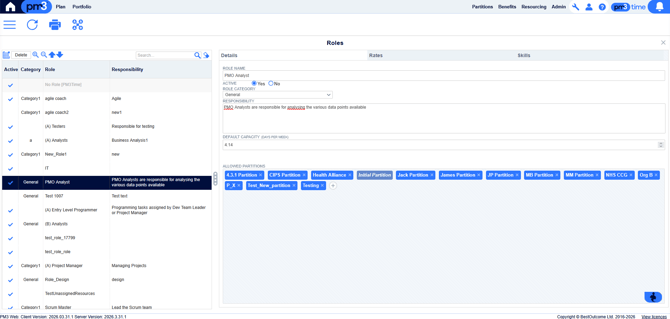
- Allows for Resource Managers to define the set of Roles and their properties.
- A Role (also called Resource Pool by various customers) refers to a group of people with similar skills such as Project Manager or Database Analyst. These roles are defined by local administrators.
- A person's membership within a role is time-windowed - i.e. a person has a start date and an end date for joining a role. A user may have multiple role memberships defined as long as these time windows do not overlap, i.e. a user may not be in more than one role at the same time.
- To edit an existing Role, click on a row on the left hand side; you can now edit details on the right hand side. There are several sub-tabs for different areas of the role to manage:
- Details - General information about the role, such as its name, description, and which partitions it is a part of.
- Rates - This view is used to define the rates for a role, i.e. how much a member of the role will (by default) cost per hour/day. These rate records are time-windowed, and cannot overlap one another - so there is only one active rate for the role at any one time. Please see the Resourcing Rates article for more information.
- Skills - The skills generally associated with a member of this role.